Top 10 AI Tools for Enterprise Search and Knowledge Management in 2026
Enterprise search solves 10% of the problem. Acting on what you find is the other 90%. Here are 10 AI tools ranked by how far they go beyond search, from pure search platforms to autonomous agents.
Enterprise AI search tools index your internal systems, surface answers in seconds, and — in the most advanced platforms — complete the workflows those answers require. By 2026, the information-finding part works. Tools like Glean, Coveo, and Elastic can index hundreds of enterprise systems and return relevant results fast. McKinsey estimates employees still spend 1.8 hours every day searching for information — and solving that is genuinely valuable. But it is about 10% of the actual problem.
Here is the uncomfortable truth most vendors will not tell you: searching is about 10% of the actual problem.
Think about what happens after someone finds the right document, the right data point, the right answer. They copy it into another system. They cross-reference it with three other sources. They validate it against business rules. They make a judgment call. They handle an exception. They route it to someone else. They execute an action. They document what they did. That is 90% of the work. And none of the pure-search tools on this list touch it.
This matters because enterprises did not invest in AI to help people search faster. They invested to transform business processes. The question is not "can my team find information?" It is "can AI complete the work that information points to?"
Here are 10 AI tools for enterprise search and knowledge management, ranked not just by how well they search, but by how far they go beyond it.
What makes enterprise AI search different from traditional search?
Traditional enterprise search tools (early-generation SharePoint, Autonomy, fast-search) relied on keyword matching and manual index configuration. Enterprise AI search uses large language models and semantic understanding to interpret meaning, not just words. An employee can ask "what is our refund policy for enterprise clients who have been with us more than three years?" and get a direct answer pulled from the right policy document — even if the document never uses those exact words.
The best current platforms go further: they maintain an organizational knowledge graph that understands relationships between people, teams, projects, and documents. They enforce access permissions at query time. They surface content from dozens of connected systems — Confluence, Slack, Salesforce, SharePoint, Jira — in a single results view.
What they do not do is act. Finding the right policy document is not the same as applying it, flagging an exception, updating a record, or routing a case. That is the gap that separates search tools from agent platforms.
Enterprise AI search vs AI agents: what is the difference?
Enterprise AI search answers the question "where is the information?" AI agents answer the question "what needs to happen next?"
An enterprise search tool returns a result. An AI agent collects data from multiple systems, validates it against business rules, makes a decision within defined guardrails, handles the exception, and executes the action. One is a read operation. The other is an end-to-end workflow.
Most enterprises discover this distinction after deploying a search tool. Search deploys. Employees find things faster. Leadership celebrates early adoption numbers. Then results plateau. The business metrics AI was supposed to move — support resolution time, sales research throughput, onboarding conversion, compliance review speed — have not changed. People find information faster, but the multi-step workflows that drive revenue and efficiency are still 100% manual.
That is not a search tool failure. It is a category limitation.
Quick comparison
| Tool | Category | Search strength | Completes workflows? | Best for | Pricing |
|---|---|---|---|---|---|
| Nexus | Autonomous agent platform | Agents access 4,000+ systems during execution | Yes, end-to-end | Full enterprise process automation | Per-agent |
| Glean | Enterprise AI search | Excellent cross-system search, 100+ connectors | Adding agent actions | Finding information across enterprise tools | ~$50/user/mo |
| Microsoft Copilot | AI assistant | Microsoft 365 only | No | Individual productivity in Microsoft apps | $30/user/mo |
| Hebbia | Document AI | Deep document analysis and extraction | Partial (document workflows) | Legal, finance, compliance document review | Enterprise |
| Coveo | AI search platform | Strong external-facing search and recommendations | No | E-commerce and customer portal search | Per-query/enterprise |
| Guru | Knowledge management | Curated, verified knowledge cards | No | Team wikis and verified knowledge | From $15/user/mo |
| Elastic | Search infrastructure | Powerful, highly customizable search engine | No (infrastructure layer) | Engineering teams building search | Usage-based |
| Algolia | Search API | Fast, developer-friendly search APIs | No (API layer) | Product search and developer teams | Usage-based |
| Sinequa | Enterprise search | Strong for regulated industries, multilingual | No | Large enterprises with compliance needs | Enterprise ($250K+/yr) |
| Lucidworks | AI search platform | E-commerce and workplace search | No | Retail and content-heavy organizations | Enterprise |
The tools, ranked
1. Nexus
What it is: An autonomous agent platform paired with Forward Deployed Engineers who embed with your team. Nexus agents do not just search your enterprise systems. They complete entire business workflows end-to-end: collecting data from multiple sources, validating it against business rules, making decisions within guardrails, handling exceptions, escalating when uncertain, and executing actions across systems. Business teams build and own the agents. No engineering dependency.
Search capability: Nexus agents access 4,000+ enterprise systems during workflow execution. They pull live data from CRMs, ERPs, knowledge bases, databases, communication tools, and custom APIs as part of completing work. This is not search in the traditional sense. It is real-time data access embedded in autonomous process execution. The agent does not return results for a human to act on. It acts on what it finds.
Why it is different from every other tool on this list:
Every other tool on this list helps someone find information faster. Nexus agents complete the work that information points to. That is not a feature difference. It is a category difference.
- Orange Group (multi-billion euro telecom): Built autonomous customer onboarding agents. The agent collects customer information, validates data against backend systems, checks compatibility, routes unusual cases, and escalates complex issues. Deployed in 4 weeks. 50% conversion improvement. ~$6M+ yearly revenue. 90% autonomous. 100% team adoption.
- European telecom (13,000+ employees): Spent 6 months with Copilot Studio, could not deliver a single production use case. Deployed a dozen Nexus agents. 40% support volume freed across millions of interactions.
- AI infrastructure company (global, engineering-led): Their sales team did not need better search. They needed agents that autonomously analyze 12,000+ enterprise accounts, synthesize buying signals from dozens of data sources, and deliver structured intelligence. 24,000+ hours of research capacity added annually. Built by a non-engineer.
Pricing: Per-agent, tied to value delivered. Not per-seat.
Best for: Enterprises where the bottleneck is not finding information but completing high-volume workflows that cross multiple systems.
Full Nexus vs Glean comparison →
2. Glean
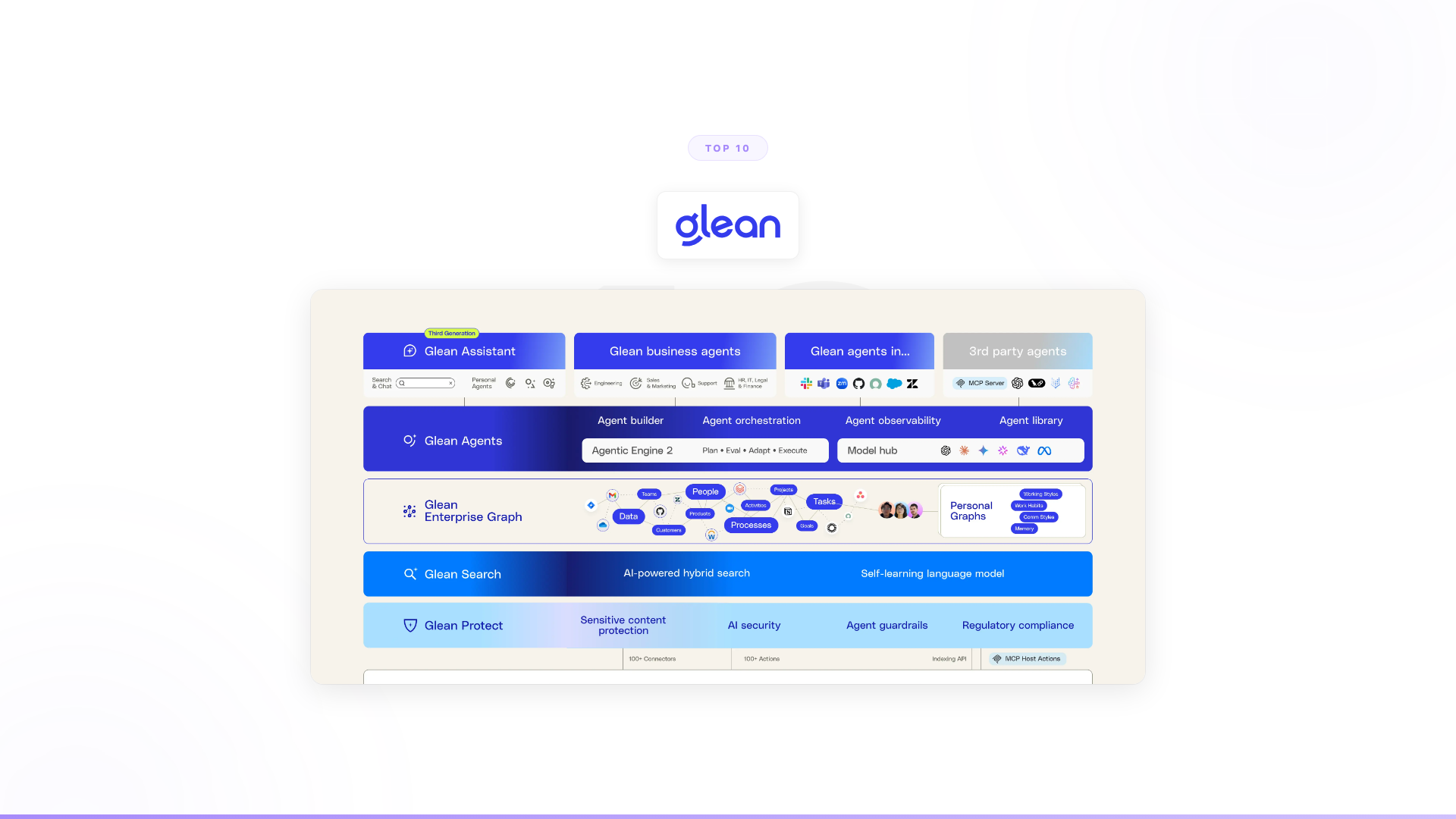
What it is: Enterprise AI search and knowledge platform. Connects to 100+ enterprise data sources (Confluence, Slack, Drive, SharePoint, Salesforce, Jira) and lets employees search across all of them with natural language. Also includes an AI assistant that answers questions from your company's knowledge and is adding agent capabilities with 100+ native actions.
Search capability: Excellent. Glean has built an Enterprise Graph that understands organizational context, permissions, and relationships between information. Their search genuinely works well for finding things across enterprise tools. $200M+ ARR and customers spanning 27+ countries validate this.
What it does well: If your team wastes hours every week searching for information scattered across a dozen tools, Glean solves that. Natural language search across all your systems, with AI-generated answers sourced from your company's knowledge. That is a real problem, and Glean handles it well.
Where it stops: Finding information. Glean is adding agent actions (100+ native actions across connected apps), but the architecture was built around search, knowledge, and content. The depth of automation it can handle is bounded by that foundation. When the workflow requires orchestrating across multiple systems, handling exceptions intelligently, and executing multi-step processes autonomously, you are past what a search-first platform was designed for.
Pricing: Per-seat, starting around $50/user/month. Minimum enterprise contracts around $50K–60K/year.
Best for: Companies where the biggest problem is employees cannot find information across enterprise tools.
See our full Glean alternatives guide →
3. Microsoft Copilot
What it is: Microsoft's AI assistant embedded across Microsoft 365. Drafts emails, summarizes meetings, generates content, analyzes data. Works within the Microsoft ecosystem.
Search capability: Limited to Microsoft 365. Copilot can search across SharePoint, OneDrive, Teams, Outlook, and other Microsoft tools. It does not index Salesforce, Slack, Confluence, or anything outside Microsoft's ecosystem. For organizations that live entirely in Microsoft, this covers a reasonable amount. For most enterprises with a diverse tool stack, it is a partial view.
What it does well: Individual productivity inside Microsoft apps. Summarizing a long email thread, drafting a document based on your notes, analyzing an Excel dataset. For those specific tasks, it is useful.
Where it stops: Same place as Glean, but with narrower scope. Copilot assists individuals with surface-level tasks inside one ecosystem. It does not complete multi-step business processes, work across non-Microsoft systems, or make decisions autonomously. Gartner has noted that enterprise-wide deployment beyond early pilots has been slower than initial adoption forecasts suggested — adoption tends to concentrate among power users rather than spreading across organizations.
Pricing: $30/user/month (Microsoft 365 Copilot).
Best for: Organizations heavily invested in Microsoft 365 who want productivity assistance inside that ecosystem.
Full Copilot alternatives guide →
4. Hebbia
What it is: AI platform for deep document analysis. Specializes in complex document-heavy workflows: analyzing hundreds of financial documents simultaneously, extracting specific data points from contracts, processing regulatory filings. Particularly strong in finance, legal, and compliance.
Search capability: Different from traditional enterprise search. Hebbia does not index your Slack and Confluence. It takes large document sets (deal rooms, contract databases, regulatory archives) and lets you ask complex analytical questions across all of them simultaneously. Think "what are the termination clauses across these 200 contracts?" rather than "where is the Q3 report?"
What it does well: For document-heavy analysis tasks, Hebbia is impressive. Financial analysts reviewing deal documentation, legal teams doing due diligence, compliance teams processing regulatory filings. These are real, time-consuming workflows, and Hebbia handles them well.
Where it stops: Scope. Hebbia excels at the analysis step within document-centric workflows. It does not extend to sales operations, customer onboarding, support triage, or cross-system workflows that are not centered on document analysis.
Pricing: Enterprise licensing, custom pricing.
Best for: Finance, legal, and compliance teams with heavy document analysis requirements.
Full Nexus vs Hebbia comparison →
5. Coveo
What it is: AI-powered search and recommendations platform focused on external-facing experiences. Powers product discovery on e-commerce sites, knowledge articles in customer portals, and case deflection in support experiences. Strong at relevance tuning and personalization.
Search capability: Strong for external-facing use cases. Coveo's relevance engine learns from user behavior and continuously improves result quality. For e-commerce product search and customer self-service portals, the AI-powered relevance is genuinely better than basic search.
What it does well: If the problem is "customers cannot find the right product on our website" or "support cases could be deflected with better self-service search," Coveo handles that well. The machine learning that optimizes relevance based on user behavior is a real differentiator for these use cases.
Where it stops: External-facing search. Coveo was not designed for internal enterprise knowledge management or business process automation. If the problem is your employees cannot find things across internal systems — or the bigger issue is completing the work after finding information — Coveo does not address it.
Pricing: Per-query or enterprise licensing, custom pricing based on volume.
Best for: E-commerce product discovery and customer-facing self-service search portals.
6. Guru
What it is: Knowledge management platform for teams. Centralized wiki with AI-powered search, expert verification workflows, and a browser extension that surfaces relevant knowledge cards while employees work. Emphasizes knowledge freshness through mandatory verification cycles.
Search capability: Good within its scope, which is curated internal knowledge. Guru's strength is not indexing everything automatically like Glean. It is providing verified, trusted answers because subject matter experts have reviewed and approved the content. The trade-off is coverage: you only find what someone explicitly created and verified.
What it does well: Teams with critical tribal knowledge benefit from Guru's verification model. "What is our return policy for enterprise clients?" gets a verified, current answer because someone was assigned to keep that card updated. For support teams, sales enablement, and onboarding, that reliability matters.
Where it stops: Curation overhead is real. Someone has to write, organize, and verify every knowledge card. And once someone finds the answer, Guru's job is done. The work that follows is still manual.
Pricing: Starts at $15/user/month (Builder), enterprise pricing for larger teams.
Best for: Teams that need curated, verified internal knowledge with clear ownership and freshness guarantees.
7. Elastic
What it is: Open-source search engine (Elasticsearch) with enterprise features. Powers search for some of the largest websites and applications in the world. Highly customizable, highly scalable, and used as the search infrastructure layer by many other tools (including, historically, some enterprise search vendors).
Search capability: Technically powerful. Elastic can index virtually anything, handle massive scale, and support complex query patterns. It is the most flexible search engine available. But it is infrastructure, not a product. You need engineering resources to build, configure, tune, and maintain your search application on top of it.
What it does well: If you have a strong engineering team and specific search requirements that off-the-shelf products cannot meet, Elastic gives you the building blocks to create exactly what you need. Their Elasticsearch Relevance Engine (ESRE) adds vector search and AI-powered ranking.
Where it stops: Elastic is a search engine, not an enterprise knowledge management solution. Building a Glean-like experience on Elastic requires significant engineering investment for connectors, permissions, UI, relevance tuning, and maintenance. And even then, you have built a search tool. The workflow completion gap remains.
Pricing: Open-source core. Cloud service starts at usage-based pricing. Enterprise licenses for on-premises deployments.
Best for: Engineering teams that need a customizable search infrastructure layer and have resources to build on top of it.
8. Algolia
What it is: Search-as-a-service API platform. Provides fast, developer-friendly search APIs that power product search, content discovery, and internal search applications. Known for speed (millisecond response times) and developer experience.
Search capability: Fast and developer-friendly. Algolia's strength is making it easy for engineering teams to add high-quality search to their applications. The hosted API handles indexing, relevance, typo tolerance, and faceting. For building search features into products, Algolia is a strong choice.
What it does well: Product teams that need search functionality shipped quickly. E-commerce search, documentation search, marketplace search, SaaS application search. The API-first approach means developers can integrate it in days, not months.
Where it stops: Algolia is a search API, not an enterprise knowledge management platform. It does not connect to your Salesforce, Slack, and Confluence automatically. It does not provide AI-generated answers from your company knowledge. And like every search tool on this list, it stops at "here are the results."
Pricing: Free tier. Paid plans start at usage-based pricing. Enterprise plans for larger scale.
Best for: Developer teams building search features into applications and products.
9. Sinequa
What it is: Enterprise search platform designed for large, regulated industries. Strong in government, financial services, life sciences, and energy. Emphasizes security, compliance, multilingual support, and integration with complex legacy systems.
Search capability: Solid for regulated environments. Sinequa handles complex security models (document-level permissions, classification-based access), multilingual content across 20+ languages, and integration with legacy enterprise systems that most search vendors do not support. For large organizations with strict compliance requirements, these capabilities matter.
What it does well: If you are a government agency, a bank with strict data classification, or a pharmaceutical company with multilingual regulatory documents, Sinequa addresses the specific search challenges those environments create. The security and compliance capabilities are genuine differentiators in regulated industries.
Where it stops: Still search. Sinequa is a more specialized search tool for specific enterprise contexts, but it does not extend to workflow automation, decision-making, or autonomous process execution. Finding a classified document securely is valuable. Completing the workflow that document is part of requires something else.
Pricing: Enterprise licensing, custom pricing. Typically $250K+ annually for large deployments.
Best for: Large organizations in regulated industries with complex security, compliance, and multilingual search requirements.
10. Lucidworks
What it is: AI search platform focused on e-commerce and workplace search. Built on Solr/Fusion architecture. Combines traditional search with machine learning for relevance optimization, personalization, and query understanding.
Search capability: Decent for e-commerce and content-heavy environments. Lucidworks combines traditional search infrastructure with AI-powered relevance, similar to Coveo. Their Connected Experience Cloud connects customer-facing search with internal knowledge search.
What it does well: Retail and content organizations that need both external product search and internal knowledge management from one vendor. The unified approach across customer-facing and employee-facing search can simplify the stack.
Where it stops: Search and recommendations. Lucidworks helps people and systems find relevant information. Like every other tool in this category, it does not complete workflows, make decisions, handle exceptions, or execute actions. The 90% of work that happens after search remains untouched.
Pricing: Enterprise licensing, custom pricing based on deployment size.
Best for: Retail organizations and content-heavy enterprises that need unified internal and external search.
The real question: what happens after search?
Here is the pattern enterprises follow when evaluating these tools.
Phase 1: "We need better search." They deploy Glean, Coveo, Elastic, or one of the others. Search improves. Employees can find things faster. The knowledge management software market is projected to grow from $22.9 billion in 2025 to $81.9 billion by 2035 — that spend reflects a real problem organizations are paying to solve.
Phase 2: "Wait. Search was not the bottleneck." The processes that drive revenue, retention, and efficiency are still manual. People find information in seconds instead of minutes, but the multi-step work that follows still takes hours. Across thousands of transactions, that work is where the cost and the opportunity sit.
Phase 3: "We need AI that completes work, not just finds information." This is where the category shifts from search tools to agent platforms.
The difference is not incremental. A search tool returns results for a human to act on. An agent collects data from multiple systems, validates it against business rules, makes a decision, handles the exception, and executes the action. It does not find the answer. It completes the work the answer points to.
That is what Orange needed. Their team could find customer data. They could not complete onboarding at scale across multiple countries with full compliance. Nexus agents now handle it end-to-end. 50% conversion improvement. ~$6M+ yearly revenue. Deployed in 4 weeks.
That is what a major European telecom needed. They could find answers in their knowledge base. They could not resolve 40% of support interactions autonomously. They spent 6 months trying with Copilot Studio and failed. Then deployed Nexus agents. 40% support volume freed.
Search is solved. The question is: what are you going to do about the other 90%?
How to choose an enterprise AI search tool
The right tool depends on what your actual bottleneck is.
If employees cannot find information across fragmented systems: Glean is the strongest pure enterprise search platform. Its Enterprise Graph, 100+ connectors, and AI-generated answers make it the benchmark for this use case.
If you need external-facing search for customers or e-commerce: Coveo and Lucidworks are purpose-built for this. Their relevance engines learn from user behavior in ways that generic search cannot match.
If your team analyzes large document sets: Hebbia handles this better than any search tool. Finance, legal, and compliance teams with document-heavy workflows should evaluate it.
If you are in a heavily regulated industry: Sinequa's security model and multilingual capabilities are hard to match. The $250K+ price tag reflects that specialization.
If you need search infrastructure your engineers control: Elastic gives you the most flexibility, at the cost of significant build investment.
If the bottleneck is not finding information but completing the work: None of the above. The category you want is autonomous agent platforms, and that is a different evaluation entirely.
FAQ: Enterprise AI search
What is enterprise AI search?
Enterprise AI search uses large language models and semantic understanding to index internal systems — Confluence, SharePoint, Slack, Salesforce, and others — and surface relevant answers to employee queries in natural language. Unlike keyword-based search, AI search interprets meaning, understands organizational context, and can generate direct answers sourced from multiple documents. The most advanced platforms also maintain a knowledge graph that understands relationships between people, teams, and content.
How is AI search different from traditional enterprise search?
Traditional enterprise search relies on keyword matching and manually maintained indexes. Employees had to know exactly what they were looking for. AI search understands intent: an employee asking "what did the sales team decide about the enterprise pricing tier last quarter?" gets a direct answer even if no document uses those exact words. AI search also handles permissions at query time, so results are scoped to what each user is allowed to see.
Can AI search tools take action, or do they just find information?
Standard enterprise search tools — Glean, Coveo, Elastic, Sinequa — find information. They return results for a human to act on. Some platforms are adding limited "actions" (Glean now has 100+ native actions), but these are typically shallow integrations. Completing a multi-step business workflow — collecting data from five systems, validating it against business rules, making a decision, handling an exception, executing an action — requires a different category of tool: an autonomous agent platform.
What is the best enterprise AI search tool for large organizations?
For pure search across internal systems, Glean is the most enterprise-mature option. For external-facing or e-commerce search, Coveo leads. For regulated industries with strict security requirements, Sinequa is the specialist choice. If the goal is automating business processes end-to-end (not just finding information), the right category is agent platforms, not search tools.
How long does enterprise AI search deployment take?
Pure search platforms like Glean typically require weeks to months, depending on the number of integrations and permission model complexity. Infrastructure tools like Elastic take longer because engineering teams build the application layer. Agent platforms like Nexus take a different approach: Forward Deployed Engineers embed with your team and the first agents go into production within weeks, with a 3-month proof of concept tied to measurable outcomes.
Worth exploring?
If your team already has access to information and the bottleneck is completing the work at scale, it might be worth seeing what autonomous agents look like in practice.
Every Nexus engagement starts with a 3-month proof of concept tied to measurable outcomes. Forward Deployed Engineers embed with your team from day one. You see results before committing. You can exit anytime.
See the full Nexus vs Glean comparison →