How to Deploy an AI Knowledge Assistant for Your Enterprise (2026 Guide)
A practical guide to deploying AI knowledge assistants in the enterprise. From assessment to selection to deployment, plus why the best enterprises are moving beyond assistants to agents that act.
What is an AI knowledge assistant?
An AI knowledge assistant connects your company's knowledge sources — documents, wikis, CRMs, help centers, intranets — to a conversational AI interface. Employees ask questions in natural language instead of manually searching multiple systems. The AI retrieves, synthesizes, and surfaces the answer. Deploying one well involves five stages: assessing your actual knowledge problems, selecting the right tool category, piloting with one team, measuring the gap between finding and acting on information, and deciding whether to expand or pivot to autonomous agents.
Most enterprises that deploy an AI knowledge assistant follow the same trajectory. Leadership approves the budget. IT connects the knowledge sources. Usage spikes in week one. By month three, adoption has plateaued. The pattern is predictable — and the fix starts before you select a vendor.
According to Gartner's 2025 Innovation Guide for Generative AI Knowledge Management Apps, the market for AI-assisted knowledge retrieval is now a defined enterprise software category, with vendors across search engines, conversational AI, and productivity tools competing for the same budget. Gartner also projects that 40% of enterprise applications will feature task-specific AI agents by the end of 2026 — up from less than 5% in 2025. The category is maturing fast. Choosing the right tier of it matters more than choosing the right vendor within a tier.
This guide covers how to deploy an AI knowledge assistant well, including the steps most teams skip. It also covers the honest question you should answer before starting: do you need AI that finds information, or AI that acts on it?
Before you start: the assessment that matters
Step 1: Map your actual knowledge problems
Most deployments fail because the problem was defined too broadly ("we need AI for our knowledge base") instead of specifically enough to evaluate whether the solution actually helps.
Before evaluating any tool, spend a week documenting the specific situations where employees struggle with knowledge.
Questions to ask:
- Where do employees spend the most time searching for information? Which systems? What types of questions?
- When they find the information, what do they do with it? Is finding it the end, or the beginning of a multi-step process?
- What percentage of support/sales/operations time is spent searching vs. executing?
- Are the knowledge problems about access (can't find it), accuracy (found it but it's wrong), or action (found it but still need 10 manual steps to complete the work)?
Why this matters: If 80% of the time waste is in searching for information, a knowledge assistant genuinely helps. If 80% of the time waste is in the manual work after finding the information, a knowledge assistant makes one step faster while the real bottleneck stays untouched.
Step 2: Quantify the gap between finding and acting
This is the step most teams skip, and it's the one that determines whether an assistant will deliver lasting value or plateau after the novelty wears off.
Map three representative workflows end-to-end:
- Pick a workflow from support, sales, and operations
- Time each step: searching for information, interpreting it, validating it, making a decision, executing the action, handling exceptions, communicating the result
- Calculate what percentage of total time is "finding information" vs. "acting on information"
Typical findings (Nexus internal analysis across enterprise deployments):
- In support workflows, finding the right policy or procedure is 10–20% of the work. Applying it to the specific customer situation, checking the account, taking the action, and handling exceptions is 80–90%.
- In sales workflows, finding account intelligence is 15–25% of the work. Synthesizing it, making the qualification decision, preparing the outreach, and following up is 75–85%.
- In operations workflows, finding the relevant process or data is 10–15% of the work. Executing the process across systems is 85–90%.
If the "finding" percentage is high, a knowledge assistant will deliver meaningful ROI. If it's low, the assistant improves a small piece while the larger problem remains.
Step 3: Define success metrics before selecting a tool
Vague goals produce vague results. Define specific, measurable outcomes before you start evaluating.
Good metrics:
- Reduction in average search time per query (measurable, attributable)
- Percentage of questions resolved without human escalation (if the AI answers correctly)
- Employee satisfaction with information access (survey, before and after)
- Reduction in time-to-resolution for support tickets (if the bottleneck is truly information access)
Metrics that sound good but mislead:
- "Number of queries per day" (measures usage, not value — high usage can mean the AI isn't answering questions well and people keep trying)
- "AI adoption rate" (measures whether people opened the tool, not whether it improved their work)
- "Number of knowledge sources connected" (measures configuration, not outcome)
What types of AI knowledge tools exist?
The category question
This is the most important decision you'll make, and it happens before you compare vendors. There are three categories of AI knowledge tools, and they solve fundamentally different problems.
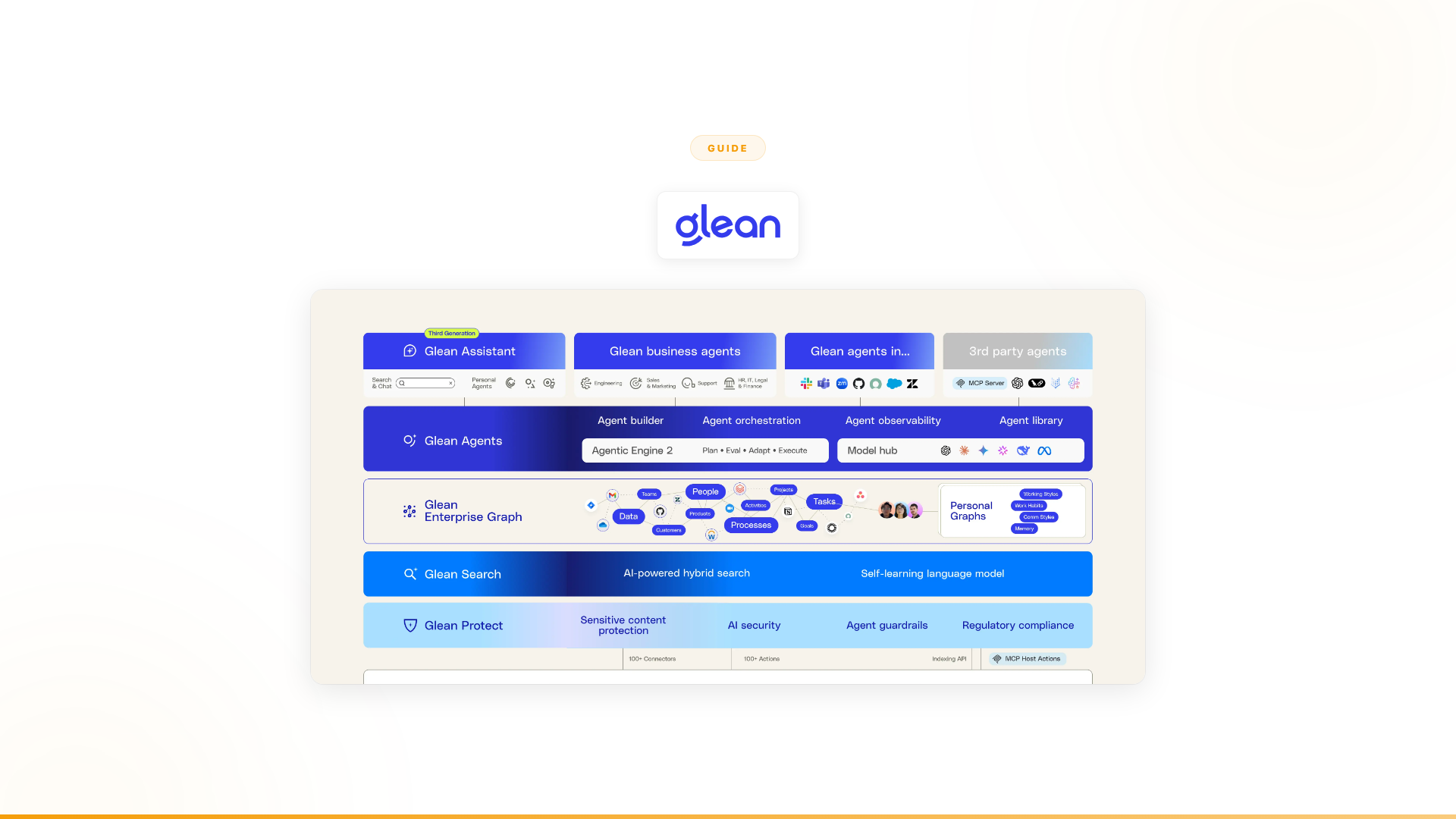
Category 1: Knowledge assistants (find and answer) Tools: Langdock, Glean, Notion AI, Confluence AI, Guru, Dust
These connect your knowledge sources to AI so employees can search and get answers through natural language. They make finding information faster and easier. The employee still does everything else: interpreting, validating, deciding, acting, handling exceptions.
When this is the right category: Your Step 2 analysis shows that finding information is a large percentage of total workflow time. Employees genuinely can't find what they need, and that's the primary bottleneck.
Category 2: Knowledge management platforms (organize and maintain) Tools: Guru, Document360, Tettra, Slite
These help you build, organize, verify, and maintain your knowledge base. The AI layer makes the content more accessible, but the primary value is in the management: keeping knowledge accurate, up-to-date, and structured.
When this is the right category: Your knowledge base is stale, inaccurate, or disorganized. The problem isn't AI search. It's that the information employees find can't be trusted.
Category 3: Autonomous agents (find, decide, and act) Tools: Nexus
These use enterprise knowledge as the foundation for autonomous workflow completion. The AI doesn't just find information. It applies it to the specific situation, validates against systems, makes decisions within guardrails, handles exceptions, and executes actions across enterprise systems.
When this is the right category: Your Step 2 analysis shows that finding information is a small percentage of total workflow time. The real bottleneck is the multi-step process that comes after: the cross-system execution, the decisions, the exceptions.
Evaluating vendors within your category
Once you've identified the right category, compare vendors on these dimensions.
For knowledge assistants:
| Criterion | What to evaluate | Why it matters |
|---|---|---|
| Connector coverage | Which of your knowledge sources does the tool index? | A tool that covers 80% of your sources leaves 20% of knowledge unfindable |
| Search quality | Ask 20 real questions from your team. How many does the AI answer correctly? | Connectors mean nothing if the answers are wrong |
| Data residency | Where is data hosted? What compliance certifications? | For European enterprises, this can be a dealbreaker. Langdock and Glean handle this differently |
| Model flexibility | One model or multiple? Can you switch? | Different models have different strengths. Lock-in is a real risk |
| Deployment speed | Days, weeks, or months? | Faster deployment means faster time-to-value, but don't sacrifice search quality for speed |
| Pricing model | Per-user, per-query, or flat? | Per-user scales linearly with headcount. Calculate total cost at your current and projected employee count |
For autonomous agents:
| Criterion | What to evaluate | Why it matters |
|---|---|---|
| Integration depth | Read-only search or full read/write access to your systems? | Agents that can't write to systems can't complete workflows |
| Exception handling | What happens when data doesn't match expectations? | Enterprise processes are messy. Rigid automation breaks. Agents that adapt are the difference between pilot and production |
| Compliance and audit | Full decision logs? Role-based access? Regulatory certifications? | For regulated industries, this isn't optional |
| Service model | Self-serve SaaS or embedded engineering support? | Deploying agents at scale is 10% technology and 90% organizational change |
| Proof of value | Can you run a time-bound POC with measurable outcomes? | Nexus runs 3-month POCs tied to specific results |
| Who builds and owns it | IT, engineering, or business teams? | Business team ownership drives adoption. The most successful Nexus deployments were built by operations and sales leaders, not engineers |
Knowledge assistant vendor comparison
| Tool | Best for | Data residency | Connector depth | Pricing model |
|---|---|---|---|---|
| Glean | Large enterprise, broad source coverage | US/EU options | Deep (100+ connectors) | Per-user |
| Langdock | European enterprises (GDPR-first) | EU data centers | Moderate | Per-user |
| Notion AI | Teams already on Notion | US | Notion-only | Add-on to Notion |
| Confluence AI | Teams already on Atlassian | US/EU | Atlassian ecosystem | Add-on to Confluence |
| Dust | Developer-forward teams | EU | API-extensible | Per-user |
| Guru | Knowledge base management + search | US | Moderate | Per-user |
Deployment: the steps that actually matter
Phase 1: Start with one team and one use case (Weeks 1–2)
Don't deploy to the entire organization at once. Pick one team with a clear, measurable knowledge problem.
Good starting points:
- Customer support team that handles a high volume of policy questions
- Sales team that spends significant time researching accounts
- Operations team that needs to check procedures across multiple documents
What to do:
- Connect the knowledge sources that team uses most (not every source in the company)
- Define 20–30 test questions that represent the team's real daily queries
- Measure baseline: how long does it currently take to find answers?
- Deploy the tool to 10–15 people on that team
- Measure the same questions after one week
What NOT to do:
- Don't connect every knowledge source at once. Start with 3–5 that matter most.
- Don't announce it to the whole company. A quiet pilot with engaged users produces better data than a big launch with distracted ones.
- Don't skip the baseline measurement. Without it, you can't prove value.
Phase 2: Measure and iterate (Weeks 3–4)
After two weeks of usage, you'll have real data. Use it.
Measure:
- Answer quality: Of the questions people asked, what percentage did the AI answer correctly? (Ask users to rate accuracy.)
- Time saved: How much faster is information access compared to baseline?
- Adoption pattern: Are the 10–15 pilot users still using it daily, or did usage drop after week one?
- Unmet needs: What questions does the AI fail to answer? What did users try to do that the tool can't handle?
Common findings at this stage:
- The AI answers 60–70% of simple factual questions well (Nexus pilot benchmark)
- It struggles with nuanced questions that require synthesizing from multiple sources
- Users start trying to use it for tasks beyond knowledge access (taking actions, processing requests)
- Adoption dips slightly after the novelty period
Iterate based on data:
- If answer quality is low, the problem might be knowledge source quality, not the AI tool
- If users are trying to use it for actions (not just search), that's a signal your real need is beyond the assistant category
- If adoption is dropping, interview the users who stopped. Why? What's missing?
Phase 3: Expand or pivot (Weeks 5–8)
Based on Phase 2 data, make an honest decision.
Expand if:
- Answer quality is high (>80% accuracy)
- Time savings are measurable and significant
- Users are still engaging regularly
- The team's actual workflow improved (not just their search speed)
Pivot if:
- Users say "the AI finds the answer, but I still have to do all the work manually"
- Adoption dropped after week two despite good answer quality
- The time saved on search is small relative to total workflow time
- Users are asking the AI to do things it structurally can't (take actions, make decisions, handle exceptions)
This is the honest moment. Many teams discover at this stage that their real problem wasn't knowledge access. It was the manual, multi-step process that comes after. If that's what you're finding, it's not a failure of the pilot. It's a successful discovery of the actual problem.
How to calculate ROI on an AI knowledge assistant deployment
Before committing to a full rollout, calculate expected ROI using this framework:
Step 1: Baseline time cost
- Average hourly cost per knowledge worker (salary + benefits ÷ annual hours)
- Average time per week spent searching for information (from your Step 1 assessment)
- Multiply: weekly time cost per employee × headcount in scope
Step 2: Expected time reduction
- OpenAI's 2025 State of Enterprise AI report cites an average 40–60 minute daily saving for knowledge workers using AI tools
- Apply conservatively: assume 20–30% reduction in search time during the first 90 days
- Multiply: expected time reduction × hourly cost × headcount × weeks in period
Step 3: Offset against cost
- Tool cost (per-user × headcount in scope × contract period)
- Implementation cost (IT time to connect sources, training, administration)
- Net ROI = time savings − tool cost − implementation cost
What to expect: Most knowledge assistant deployments break even within 3–6 months if search time is genuinely the bottleneck. If search time is not the primary bottleneck, ROI is lower and slower.
Security and compliance considerations
Enterprise knowledge bases contain sensitive material — internal procedures, financial data, compliance policies, personnel records. Before deploying any AI knowledge assistant, evaluate these dimensions:
Access control: Does the AI respect existing document permissions, or does it surface content to users who shouldn't see it? Most enterprise-grade tools (Glean, Langdock) sync permissions from the source system. Verify this explicitly.
Data residency: Where is your data stored and processed? For European enterprises, EU data centers and GDPR compliance are mandatory. Langdock is EU-native. Glean offers EU deployment as an option. Verify data processing agreements before signing.
Audit logs: Can you see what queries were made, what content was returned, and by whom? This is required for regulated industries (financial services, healthcare, public sector).
Model training: Does the vendor use your data to train their models? Most enterprise-grade vendors do not, but this should be confirmed in writing.
SOC 2 and ISO 27001: Standard certifications for enterprise software. Verify both Type I and Type II SOC 2 for tools handling sensitive knowledge.
Beyond assistants: when to move to agents
The most common trajectory for enterprise AI looks like this:
- Deploy a knowledge assistant (Langdock, Glean, Copilot, Dust)
- Get initial value from faster information access
- Watch adoption plateau after 2–3 months
- Realize the real bottleneck is the work after finding information
- Look for something that closes the full gap
According to the Deloitte State of AI in the Enterprise 2026 report, knowledge management is identified as one of the highest-impact categories for agentic AI — alongside supply chain management, R&D, and cybersecurity. The distinction matters: an AI assistant makes finding easier; an AI agent makes acting autonomous.
This isn't a criticism of knowledge assistants. They do what they're designed to do. The question is whether that's what your organization actually needs.
Signs you need agents, not assistants:
- Your team found the assistant helpful for quick lookups but their core work process didn't change
- Support agents can find the right answer faster but still spend 80% of their time on execution steps
- Adoption dropped because the AI helps at the margins but doesn't transform the actual work
- Your workflows span 5+ systems, and the real time sink is moving between them, not searching within one
What the shift looks like in practice:
Orange Group's teams could find customer data, product specs, and pricing information. The bottleneck was the multi-step onboarding process across CRM, ERP, and WhatsApp. Nexus agents now handle that entire workflow autonomously — 50% conversion improvement, approximately €6M in annual revenue impact, 90% autonomous resolution, and 100% team adoption, deployed in 4 weeks. (Source: Nexus client data.) The previous CX chatbot had a 27% drop-out rate.
A major European telecom had spent 6 months with Copilot Studio without delivering a single production use case. Nexus agents now handle millions of interactions, freeing 40% of support volume. The knowledge was always there. What was missing was AI that could act on it. (Source: Nexus client data.)
Common deployment mistakes
Mistake 1: Connecting every knowledge source at once. More sources doesn't mean better answers. It often means more noise. Start with the 3–5 sources your pilot team actually uses. Add more based on demand, not comprehensiveness.
Mistake 2: Measuring adoption instead of outcomes. "500 queries per day" is not success. "Support ticket resolution time dropped 20%," that's success. Adoption is an input. Business outcomes are the measure.
Mistake 3: Skipping the baseline. Without before-and-after data, you can't prove the tool delivered value. Measure search time, resolution time, and employee satisfaction before deploying.
Mistake 4: Deploying company-wide before proving value. A 10-person pilot costs almost nothing and generates real data. A 5,000-person deployment costs real money and generates noise. Prove it works, then scale.
Mistake 5: Confusing "fast to deploy" with "fast to value." Connecting knowledge sources takes days. Getting accurate, reliable answers takes weeks of tuning. Getting business process improvement takes months. Set expectations accordingly.
Mistake 6: Ignoring the "find vs. act" gap. The most expensive mistake is deploying a knowledge assistant for a problem that requires workflow completion. You'll get a few months of incremental improvement, then plateau. Then you'll need to evaluate agents anyway. Better to ask the right question upfront.
The honest decision framework
| Your situation | Recommended approach |
|---|---|
| Employees spend 30%+ of time searching for information | Deploy a knowledge assistant (Langdock, Glean, or Notion AI depending on ecosystem) |
| Knowledge exists but is stale, inaccurate, or unstructured | Deploy a knowledge management platform (Guru or Document360) first, then layer AI on top |
| Finding information is easy, acting on it is the bottleneck | Skip the assistant, deploy autonomous agents (Nexus) |
| Not sure which problem you have | Run the Step 2 assessment from this guide. Map 3 workflows. Quantify find vs. act time |
| Previous AI assistant deployment plateaued | Your problem is likely "act," not "find." Evaluate agents |
FAQ: deploying an AI knowledge assistant in the enterprise
What is an AI knowledge assistant for enterprise? An AI knowledge assistant connects your company's knowledge sources (documents, wikis, CRMs, help centers) to a conversational AI interface, letting employees search and get answers in natural language instead of manually searching multiple systems. Most enterprise knowledge assistants use retrieval-augmented generation (RAG): the AI retrieves relevant content from your documents, then uses a large language model to generate an answer based on what it found.
How long does it take to deploy an enterprise AI knowledge assistant? Connecting knowledge sources typically takes days. Getting accurate, reliable answers takes 2–4 weeks of tuning and prompt refinement. Achieving measurable business process improvement takes 1–3 months. Timeline depends on the quality of your existing knowledge sources and the breadth of deployment. Poor-quality, outdated, or unstructured knowledge bases extend all three phases.
What is the difference between an AI knowledge assistant and an AI agent? An AI knowledge assistant finds and surfaces information. An AI agent goes further: it applies that information to the specific situation, validates against live systems, makes decisions within guardrails, and executes actions — without requiring a human to complete the downstream work. Gartner projects 40% of enterprise applications will feature task-specific agents by end of 2026, reflecting the industry shift from retrieval to execution.
What knowledge sources can enterprise AI assistants connect to? Most enterprise knowledge assistants (Langdock, Glean, Dust, Copilot) connect to Confluence, Notion, SharePoint, Google Drive, Salesforce, Zendesk, Slack, and custom APIs. Coverage varies significantly by vendor. Glean currently offers the broadest connector library (100+). Langdock is more selective but offers stronger EU data residency guarantees. Verify connector coverage against your specific stack before selecting a vendor.
When should an enterprise move from a knowledge assistant to autonomous agents? When your analysis shows that finding information is less than 20–30% of total workflow time and the real bottleneck is the multi-step execution after finding information — cross-system actions, decisions, exception handling — a knowledge assistant improves only the margins. The signal is typically visible in pilot data: users keep asking the AI to do things it structurally cannot do (take actions, write to systems, handle exceptions), or adoption plateaus because the AI helps at the margins without changing the core workload.
Worth exploring?
If your assessment reveals that the bottleneck isn't finding knowledge but acting on it, every Nexus engagement starts with a 3-month proof of concept tied to measurable outcomes. Forward Deployed Engineers embed with your team from day one. They identify the highest-impact use cases, build agents for your specific workflows, and ensure production adoption. You see the results before committing. You can exit anytime.
See how Nexus compares to knowledge assistants -->
Related reading
- Top 10 AI Tools for Enterprise Knowledge Management
- Top 10 Langdock Alternatives
- Langdock vs Glean: enterprise AI assistants compared
- Nexus vs Langdock: full comparison
- Nexus vs Glean: full comparison
- How to Build Enterprise Knowledge AI
- AI Agents vs AI Assistants: the category comparison
External sources: Gartner — 40% of enterprise apps will feature task-specific AI agents by 2026 | Gartner — 2025 Innovation Guide for Generative AI Knowledge Management Apps | OpenAI — State of Enterprise AI 2025 | Deloitte — State of AI in the Enterprise 2026