
Claude Code mods, from zero: a cleaner chat and how to build one
Anthropic shipped Claude Code mods on 1 October 2026. This guide explains them from zero: what a mod is, why it matters, what people built in the first days, and how we used one to make every chat cleaner, with our open source chat-clean mod and how to build your own.
- Author
- Nexus Team
- Published
- Oct 6, 2026
- Last revised
- Oct 6, 2026
- Reading time
- 21 min
- Claude Code mods are new. Anthropic shipped them on 1 October 2026, in Claude Code 2.1.287.
- A mod is a small add-on that changes how Claude Code looks and behaves. You can write one, or ask Claude to build it for you.
- The big idea: you shape the tool to how you work. See what the agent is doing, use the waiting time, keep secrets out of the chat. No waiting for a new feature.
- People built mods within hours. Progress bars, usage meters, games, a way to keep passwords out of the chat.
- We built one to clean up the chat. chat-clean keeps your words and Claude's replies, and folds the work into one line per turn.
- The cost is trust. Mods are not sandboxed. Install them only from sources you trust.
- Try ours in three steps. chat-clean is free and open source at github.com/achammah/claude-chat-clean.
1Claude Code mods, the new update
Claude Code is Anthropic's coding assistant. It works on the files of a project: it reads them, changes them and runs commands. On , Anthropic made it possible to change Claude Code itself, with mods.
- When. Mods arrived in . The release note reads: "Added Claude Mods: plugins may now modify deeper behavior" (changelog).
- Where. In the terminal from version 2.1.287, and in the desktop app from (docs). They are on by default.

Anthropic's developer account, @ClaudeDevs, announced it in three lines: "Change how it behaves", "Customize the UI", "Swap in your own features". Then: "Write one with a few lines of TypeScript, or have Claude build it for you."

Boris Cherny, who created Claude Code, wrote the same evening: "You can now customize Claude to work and look the way you want by just prompting it. Each person works differently, so there's no reason why everyone should have an identical Claude experience."
What a mod is
- In one sentence. A mod is a small add-on that runs when something happens in Claude Code, such as a tool call, a message you send, or a part of the screen being drawn. It can watch that moment, change it, or take it over (docs).
- How you get one. Mods ship inside plugins, so you install them with
/plugin, like any other plugin. - Who can make one. Anyone. Anthropic's announcement: "Ask Claude to create a mod, and it can write the TypeScript, install it, and hot reload it in your session."
The five things a mod can do
The docs list five. In plain words:
- Add its own panel. A pane beside the chat, or a band just above where you type, with tabs, buttons and text fields.
- Redraw Claude Code's own screen. For example a tool call's row, the spinner, or the box where Claude asks you a question.
- Step into an action. Hold a tool call while it asks you something, answer it without running the tool, or send a request to a different model.
- Run your own command at once. A slash command that runs your code right away, even while Claude is working.
- Share what it learns. What one part of a mod records, another part can show.
Anthropic is moving its own features to mods too: "the built-in /diff feature is now a mod, so you can turn it off (in /plugin) or replace it with your own version" (announcement).
2Why mods matter
Claude Code already had hooks: small scripts that run at set moments. Anthropic explains the step up: "Hooks helped give users some of this control, but hooks can't rewrite events, draw new UI, or replace features. Mods can." (announcement)
What you gain
- You shape the tool to how you work. You no longer wait for a feature. In Anthropic's words: "We want Claude Code to feel like yours, so you can shape it to the way you work."
- You see what the agent does, live. Most early mods show something at a glance: the progress of a plan, what a session is working on, the state of your code, or how much usage is left (section 3).
- The waiting time becomes useful. One mod puts games above the prompt, "playable while Claude works, zero tokens" (cc-arcade). Another user wrote: "I made one that makes you breathe while Claude thinks". Boris Cherny answered: "Yes!!!"
- You do not need to code. Ask Claude to write it. One developer put it simply: "I described a UI in plain English, and it showed up."
- It goes deeper than hooks. A mod can change a moment before it happens. One mod keeps passwords out of the chat history (section 3).
- You can share it. Mods ship as plugins, so others can install yours. A community catalogue already lists them.
The cost: trust
- A mod can do what Claude Code can do. Anthropic is clear: "They aren't sandboxed, and you should only install mods from sources you trust" (announcement).
- Check before you install.
claude plugin validate <folder>lists the events a mod handles and what it asks Claude Code to do (docs).
3What people built in the first days
The New Stack reported that "Users were already experimenting with more specialized uses within hours of the announcement." Here is what people built, at a glance. Their posts follow.
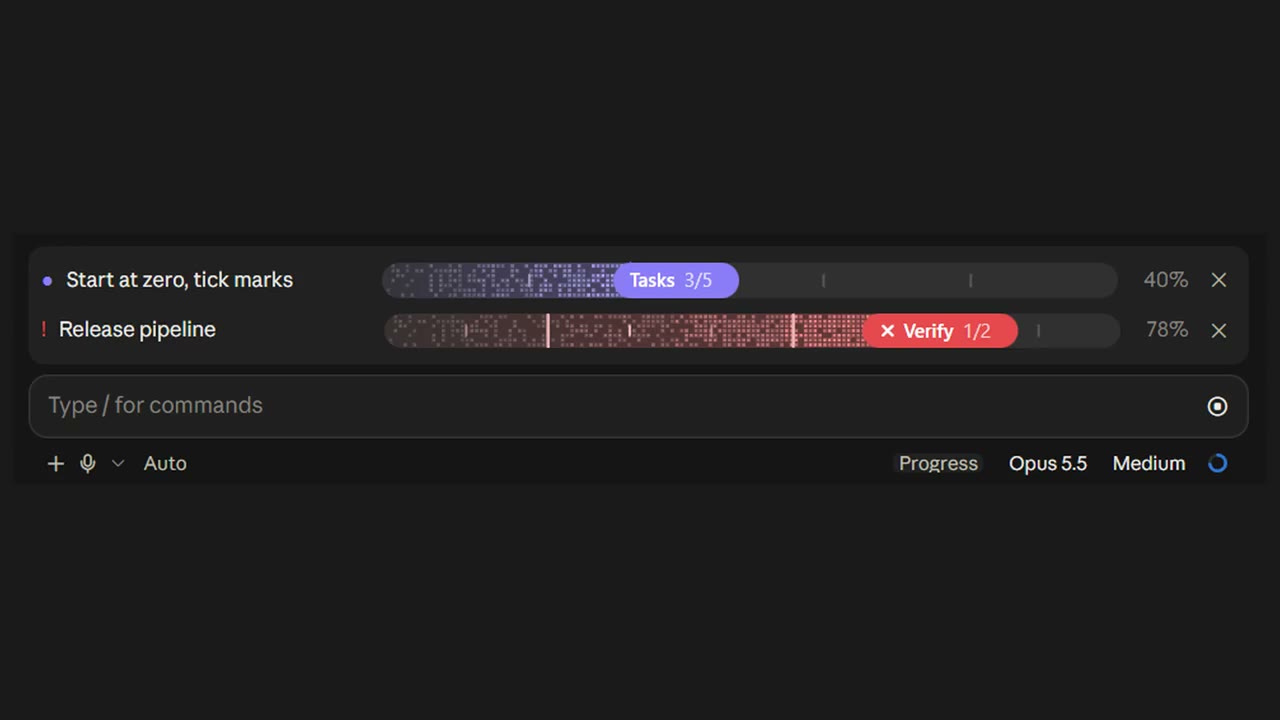
- @kirillvserditov: a live progress bar for plans, with stages, sounds and several tasks side by side.
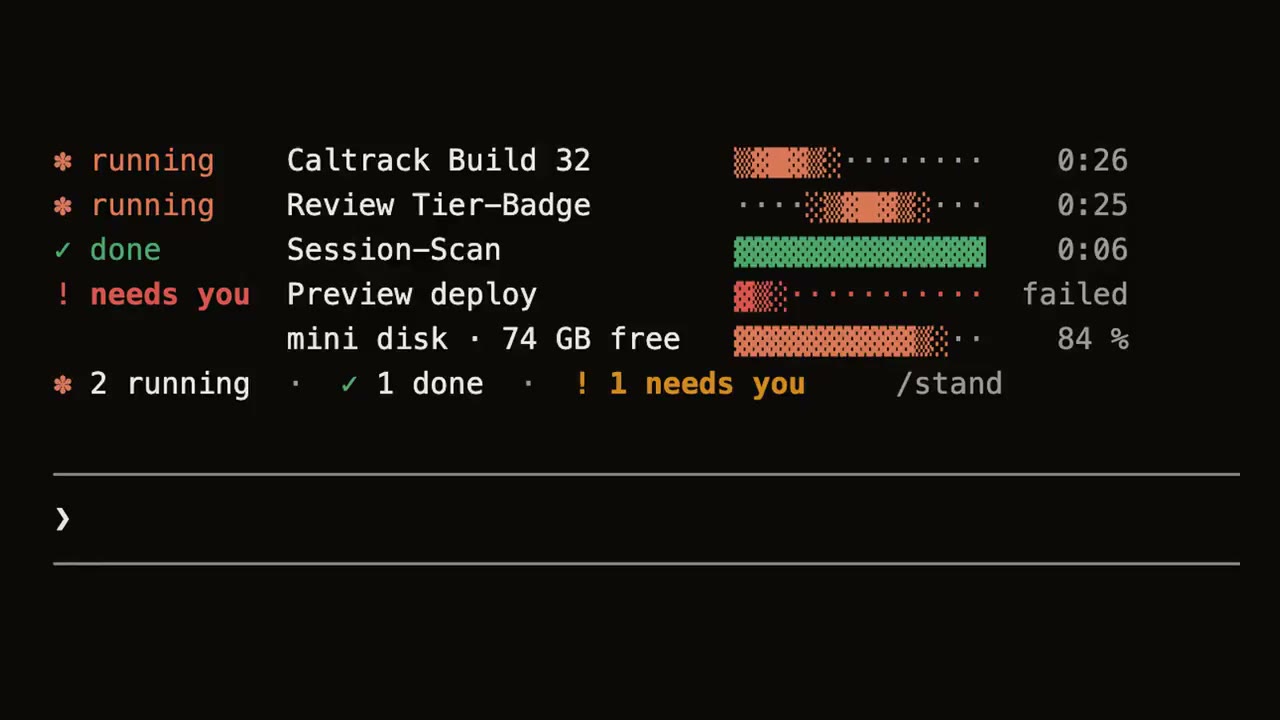
- Dom, @dominikmartn: a mod that shows what a session is working on, and when their mini's disk is about to be full.
- Hamza, @thegenioo: a first mod in the Claude Code desktop app.
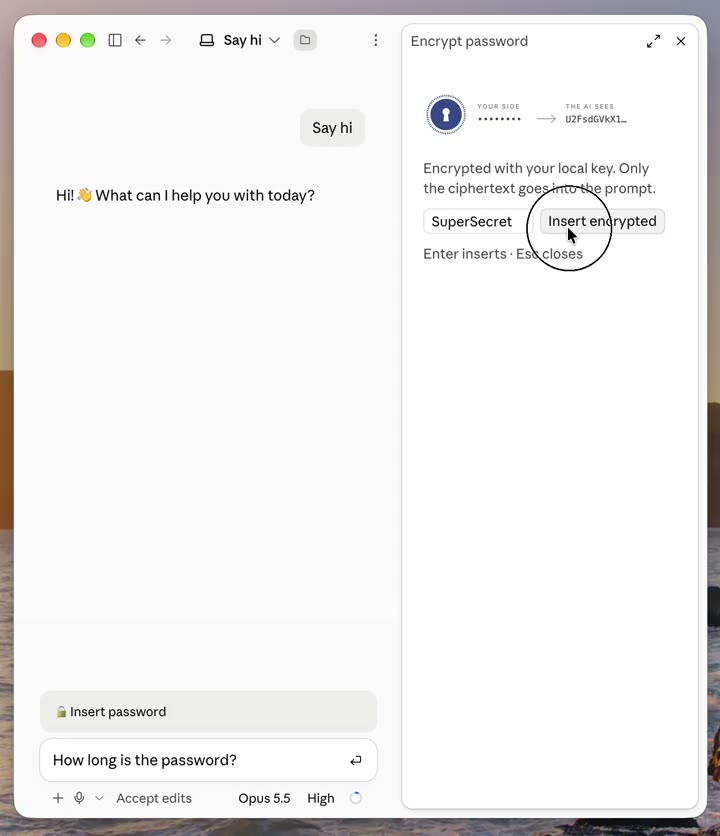
- Sean Nicholas, @sean_snd: a mod that sends encrypted passwords into the chat. Claude can work with them but never reads them.
- cc-arcade: "Tetris, and seven other games, above the prompt, playable while Claude works, zero tokens." Boris Cherny shared it before launch.
- stepline: turns the plan you approve in plan mode into a live checklist above the prompt.
- drift: folder, branch, ahead/behind and uncommitted changes above the prompt.
- cc-mod-park: park a session and resume it later from a new session in the same folder.
- awesome-claude-code-mods: a "Community catalogue of public Claude Code mods", to browse more.




4How we used it: a cleaner chat
More and more people ask an AI to do real work on their computer. Claude Code is a tool for exactly that. It is also noisy.
- Claude shows its work, all of it. Each file it reads and each command it runs gets its own block on screen.
- Your own words get buried. After a few minutes, your question sits far above a wall of commands.
- The answer is hard to find. Claude's reply is in there, between results you did not ask to see.
A mod fixes this without changing what Claude does. Claude does the same work. You just see it differently.
So we built one: chat-clean. It keeps your messages and Claude's replies, and folds the work of each turn into one line. It is free and open source. The rest of this guide shows the before and after, how to install it, and how to build your own mod.
5The words, explained once
This section assumes you know nothing about any of this. If you already use Claude Code, skip to section 6.
The tool
- Claude. An AI made by Anthropic. You write to it in plain words and it writes back.
- Claude Code. A version of Claude that works on the files of a project. It can read them, change them and run commands.
- Terminal. The plain text window where programmers type commands. Claude Code can run there.
- Desktop app. The Claude app you install on your computer. It has a Code tab that runs Claude Code in a normal window.
- Tool call. One action Claude takes, such as reading a file or running a command. A single request can lead to many.
The mod
- Mod. Short for modification. A small add-on that changes how Claude Code looks. Claude Code calls it a plugin.
- Plugin. A folder that Claude Code loads by itself. A mod is one kind of plugin.
- Hook. A small piece of code that runs at a set moment. For example, "when Claude finishes a turn" or "when this row is drawn".
- Row. One block in the chat: your message, Claude's reply, a tool call, or the band above the input.
The old way
- Status line. One or more lines of text under the input box, in the terminal. Before mods, it was the usual place to add your own information.
6Before and after
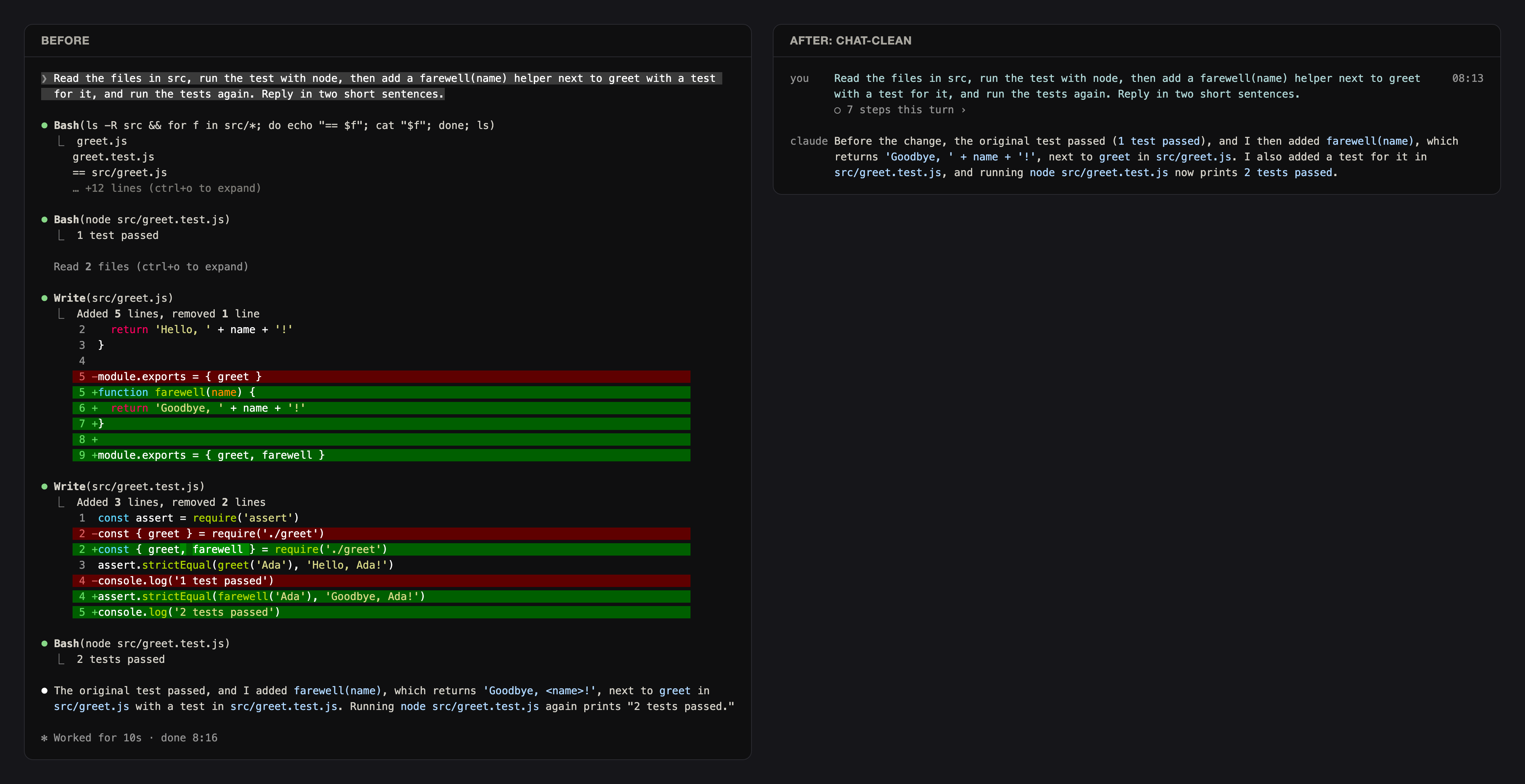
Here is the same small task, run twice. On the left, Claude Code as it comes. On the right, with the chat-clean mod.
What changed on screen
- A name column on the left.
youbeside your messages,claudebeside the replies. - The time of each of your messages, at the right edge.
- One line for the work. Every tool call of a turn folds into one line:
○ 7 steps this turn ›. The arrow opens it in place. - A working line while Claude works. A spinner, the step in plain words, and the time.
- Plain labels. A step reads
Reading app.pyor. Never a raw command, a path or an id.
What did not change
- Claude's work. The mod changes only the drawing. Claude reads, runs and answers as before.
- Nothing is lost. ctrl+o still shows the full transcript.
- You can switch back any time. Type
/feed rawand Claude Code draws everything its own way again.
7Where a clean chat helps
A mod pays off wherever a person needs to follow the work without reading every command.
Long sessions
- Many steps per request. When one request triggers dozens of tool calls, a single line per turn keeps the chat short.
- Finding your own question again. Your words stay on screen, with their time.
Work that keeps running
- Background runs. Sometimes a test keeps running after Claude has answered. Then one line above the input says so:
Running in the background · · you can keep typing. - Tests. A run that looks like a test reads
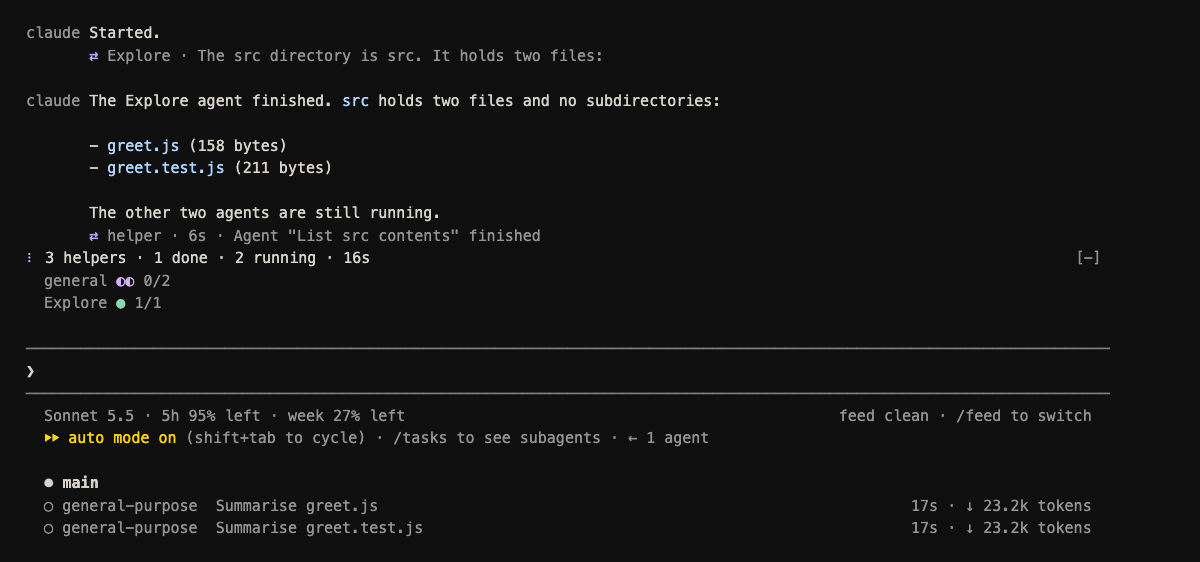
Test running. - Helpers. Claude can start helpers, also called subagents. Each gets its own line with its state and time.
/helpersopens a pane with each helper's steps.
Moments that need you
- Errors. An API error becomes one plain line, for example
! Connection lost · check your internet · send again to retry. It is amber when Claude Code handles it, red when you must act. - Questions. When Claude asks you something, the answered question becomes one line:
? Which colour → Red.


People who do not code
- Managers, analysts, designers. Anyone who asks Claude for work but does not read shell commands can read a clean chat.
8What is better than before
Before mods, the usual way to add your own information to Claude Code was the status line. It still works. A mod goes further.
How the status line works
- It is a command. You name a small program in your settings. Claude Code runs it and prints what it returns, under the input.
- It can redraw every second. With
in the settings, it redraws once a second while you wait. - A slow frame shows nothing. If the program takes longer than the interval, the frame is dropped. Our first version read running jobs with a command that took , and drew nothing at all.
- The fix was a cache. A separate background program now does the slow part and saves the result. The status line only reads it, in .


| Question | Status line | Mod |
|---|---|---|
| Where does it draw | Under the input only | Inside the chat: messages, tool rows, the band above the input, panes |
| Can it change the chat | No | Yes: fold, relabel or hide rows |
| Desktop app | Not shown at all | Works, with care (section 11) |
| Can you click it | No | Buttons and chevrons, where the screen reports clicks |
| Commands | No | Its own slash commands, such as /feed |
| Knows what Claude is doing | Only what its input says | Every turn, tool call and helper, as it happens |
The same numbers, in more places
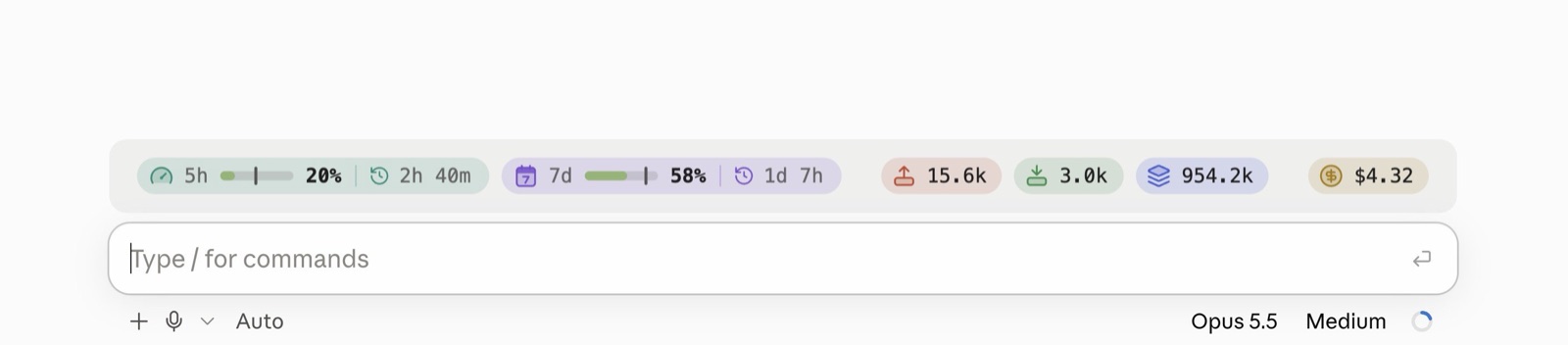
- Usage limits. A mod can read how much of your you have used. The status line gets the same figures in its input.
- Memory and cost. Both can show how full Claude's memory is and what the session has cost.
- Usage left first. When we ranked the figures, how much usage was left mattered more than memory.
9
chat-clean is our open source mod, free under the MIT licence. You need .
Before you start
- Claude Code installed. If you have never used it, install it first from Anthropic's Claude Code page, and open it once in any folder.
- A project folder. Any folder you already open with Claude Code. We call it your project.
- Check your version. In a terminal, type
claude --version. The number must be 2.1.289 or higher.
The three steps
- Copy the mod into your project, as
<project>/.claude/skills/chat-clean/. The easiest way, from inside your project folder in a terminal:
git clone https://github.com/achammah/claude-chat-clean .claude/skills/chat-clean- Start Claude Code in that project. The mod loads by itself. There is nothing to switch on.
- Type
/feed. It opens the settings page, so you can see the mod is there.
Just want to try it
- No copy needed. Start Claude Code with
claude --plugin-dir /path/to/chat-clean. Replace the path with wherever you saved the folder.
The three views
/feed clean, the default. Your messages, Claude's replies, and one line per turn for the work./feed normal. Each run of tool calls is one line with counts, for example. Nothing is cleared./feed raw. Claude Code's own drawing. The mod draws nothing.- It sticks. The view you pick is kept for your next sessions.
- Fine tuning.
/feed hide <kind>and/feed show <kind>switch one kind of row off or on. The kinds areyou,said,tool,agent,question,peer,helperandsearch.
10Build your own mod
You do not need to write a mod by hand. You can ask Claude Code to write it for you. It still helps to know the parts, so you can tell when something is wrong.
Step by step
- Ask Claude to load the plugin authoring guide first. In our version, Claude Code offered a skill called
plugin-authoringfor exactly this. When we skipped it, we drew a whole band as one picture, which is not how mods work. - Make a folder in your project:
.claude/skills/<your-mod>/. A plugin folder there loads by itself. - Add a short description:
.claude-plugin/plugin.json. It holds the name, version, description and licence. - Point to your code:
hooks/hooks.jsonholds one line,{ "modules": ["./register.tsx"] }. - Write the code:
hooks/register.tsx. Each hook says when it runs and what it draws. For example, chat-clean's band hook starts withon('ui.render', { component: 'AbovePrompt' }, ...). - Declare what you remember. If the mod keeps values between moments, name each one in
types/index.d.ts. - Check it before you look. Run
claude plugin validate <folder>, thenclaude plugin test <folder>. Both are fast. Run them after every change. - Save, and watch it reload. Saving reloads the mod in every open session of that project. In the terminal it is at once.
Claude Code refuses a mod that breaks one of these. Each one refused our code at least once.
- One code file per plugin.
hooks/hooks.jsonnames./register.tsxonly. - One hook per moment. Two hooks for the same event, in one plugin, do not load.
- Event names are written out. A hook name kept in a variable is refused.
- The engine handle stays in one file. Pass it only to functions declared in that same file.
- Every remembered value is declared in
types/index.d.ts. - No writing while drawing. Change values from an event, a timer or a button press. A drawing only reads.
Good habits
- Batch your saves. Every save reloads every open session and prints a reload line.
- Keep motion for when work runs. There is no animation built in. Motion means redrawing on a timer, such as . Stop the timer at the end of a turn.
- Use few colours. One accent, one green, one violet, grey for the rest. Red only when the person must act.
11Tweaks for the desktop app
The desktop app runs the same mods, but it is a different screen. Most of our early mistakes were here.
What is different
- It runs no status line. Nothing from the
statusLinesetting appears there. The band above the input is the place for status on desktop. - It keeps its own message look. chat-clean's name column is for the terminal only. On desktop, your messages keep the app's own bubbles.
- Some rows exist only in the terminal. The progress, turn duration and info notice rows are terminal only.
- Reloads wait. On desktop, a saved mod reloads after
/reload-pluginsor at the end of the next turn.
What chat-clean shows on desktop
- One pill with your usage: how much of you have used.
- While something runs: one pill per running helper, background job and test.
- Ask which screen you are on. Each drawing is told its surface,
terminalordesktop. Branch on it. - Keep desktop text short. The engine counts space in characters, but the desktop draws a wider font. A row of line characters took far more room than counted, and the words after it wrapped.
- Do not let pills stretch. A pill that grows can push the next one off the edge. What held: a left group and a right item, nothing stretched, one pill allowed to shrink.
- Do not lay a box over the words. A box placed on top draws above what comes after it. Our "fill behind the words" hid the words.
- Do not draw the band as a picture. The desktop can draw an image, but an interactive one sits in a . Use images only for a inside a pill.
Two practical points
- Permissions. The desktop starts in the project's permission mode, so it may ask before almost every command. We fixed it with allow rules in the project's settings, not by switching checks off.
- Look at it. You cannot see the desktop from a script. A screenshot of the Claude window, then reading it, ended .
12What a mod cannot change
Some rows belong to Claude Code itself. No mod can reach them.
- Hook rows, for example or a hook error.
- The reload line that appears when a mod reloads.
- Attachment lines under a message, for example "Read file" or "Loaded CLAUDE.md".
- The status line and the footer's task list.
- Rows drawn during a reload. They keep Claude Code's look, because they are already on screen.
13Glossary
- Band above the input
- The strip just above the box where you type. On desktop, it is where a mod shows status.
- Claude Code
- A version of Claude that reads and changes the files of a project, and runs commands.
- Desktop app
- The Claude app you install on your computer. Its Code tab runs Claude Code in a window.
- Helper
- A second Claude that the main one starts for part of a job. Also called a subagent.
- Hook
- A small piece of code that runs at a set moment, such as when a row is drawn.
- MIT licence
- A permissive open source licence. You can use, change and share the code.
- Mod
- A plugin that changes how Claude Code looks while you work.
- Plugin
- A folder that Claude Code loads by itself to add or change behaviour.
- Status line
- Text printed under the input in the terminal by a command you name in your settings.
- Terminal
- A plain text window where commands are typed.
- Tool call
- One action Claude takes, such as reading a file or running a command.
- Turn
- One request from you and everything Claude does to answer it.
Tell us where the work piles up.
We build the first procedure with your team and run it with you.
Talk to our team